
by Rafey Iqbal, Last updated: April 23, 2026
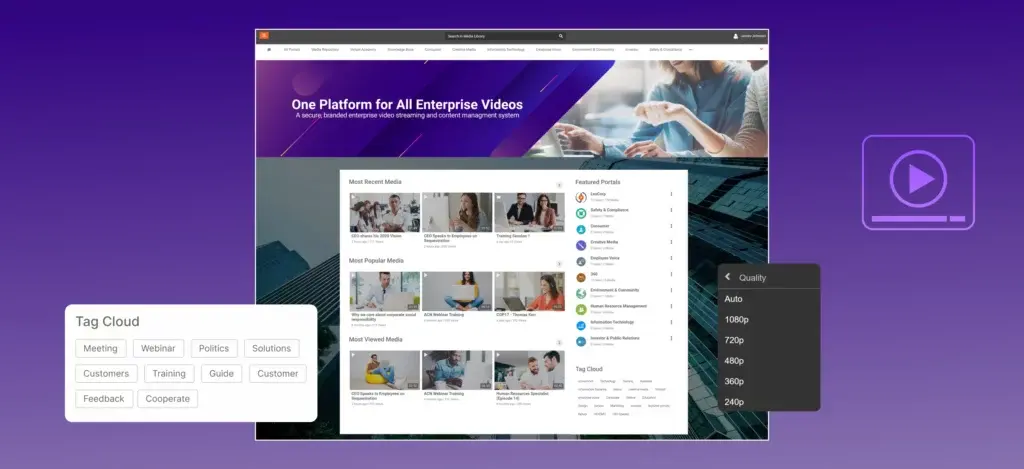
Quick answer: Enterprise video hosting is specialized software that stores, streams, and manages video content for organizations. Unlike consumer platforms, enterprise video hosting platforms include access controls, compliance tools, analytics, and flexible deployment options, making them suitable for training videos, corporate communications, investor content, and sensitive internal media.
The definition only goes so far. In practice, enterprise video hosting platforms do considerably more than store files. They encode and transcode content automatically, apply AI processing for search and accessibility, deliver video through content delivery networks, and, critically for businesses, enforce security policies that consumer platforms like YouTube simply cannot offer.
What if we told you that you can address video upload and playback errors by better understanding video hosting platforms? Listen to us. There are several reasons why your video upload gets stuck in the middle, at around 50% or 67%. Large video files usually experience this kind of error. Uploading errors eventually lead to video playback errors.
Organizations today host a wide range of content on these platforms: employee onboarding and training, executive town halls, product demonstrations, compliance training, investor relations content, and customer education. The volume and sensitivity of this content makes platform choice a strategic decision, not just a technical one.
How Enterprise Video Hosting Platforms Work
Quick answer: When a video is uploaded, the platform encodes it into multiple formats, processes it with AI for transcription and tagging, stores it securely, and delivers it to viewers through a CDN. Viewers stream the content without downloading it, with quality adapting automatically to their connection speed.
Understanding what happens behind the scenes helps organizations evaluate platforms with the right criteria. There are five distinct stages every enterprise video hosting platform performs from upload to playback.
1. Encoding and transcoding
Raw video files uploaded to an enterprise platform are rarely ready for smooth streaming. They arrive in specific formats, often at very large file sizes, that are unsuitable for delivery across varying device types and network conditions. The platform immediately begins transcoding: converting the source file into multiple formats (H.264, H.265, VP9) and creating resolution renditions from 240p through 1080p or 4K.
This process enables adaptive bitrate streaming (ABR), which allows the video player to automatically select the most appropriate resolution based on the viewer's current bandwidth. A viewer on a strong connection gets full HD. A viewer on a slower mobile connection gets a lower resolution without rebuffering or a manual quality switch.
-webp.webp?width=1024&height=1024&name=HOW-DO-VIDEO-HOSTING-PLATFORMS-WORK_-1024x1024%20(1)-webp.webp)
2. AI processing
After encoding, AI models process the content to make it discoverable and accessible. This typically includes automatic speech recognition (ASR) for transcription, machine translation for multi-language subtitles, object and text detection for visual search, and automated tagging. For organizations managing hundreds or thousands of videos, this AI layer is what makes content libraries searchable and auditable without manual effort.
3. Secure storage
Encoded content is stored in the platform's infrastructure: cloud, on-premises, or a hybrid of both. At this stage, access policies are applied, determining which users or groups can access which content, under what conditions, and for how long. The storage layer is also where data residency requirements are enforced, making this a critical consideration for organizations subject to regulations like GDPR, HIPAA, or government data sovereignty rules.
4. Content delivery via CDN or eCDN
Delivering video to a geographically distributed audience requires more than a storage server. Enterprise video hosting platforms use content delivery networks (CDNs) and, for internal audiences, enterprise CDNs (eCDNs) to cache and serve video from nodes close to the viewer. This dramatically reduces latency, absorbs traffic spikes from simultaneous viewers such as a company-wide live stream, and ensures a consistent viewing experience regardless of geography.
5. Streaming and playback
The video player delivers content progressively, so viewers watch without waiting for a full download. The player handles format compatibility across browsers and devices, enforces any DRM or token-based access policies, and reports playback telemetry back to the platform's analytics engine.
If you are interested in knowing more about CDN streaming, read our blog post on CDN video streaming.
Self-host Videos or Use Video Hosting Platforms?
Quick answer: For most organizations, enterprise video hosting platforms are significantly better than self-hosting. Self-hosting requires managing server infrastructure, encoding pipelines, bandwidth provisioning, security hardening, and backup systems at high cost. Enterprise platforms handle these automatically and add features like AI search, SSO, and CDN delivery that are not practical to self-build.
-webp.webp?width=1024&height=1024&name=Everything-you-need-to-know-about-video-hosting-platforms-Table-1024x1024%20(1)-webp.webp)
Setup complexity
Self-hosting requires server infrastructure, RAID storage, and network configuration before a single video can be uploaded. An enterprise platform replaces all of that with a web interface accessible from day one, with no infrastructure procurement or technical setup required.
Encoding
Self-hosted video requires a third-party encoder that adds significant CPU and GPU overhead. Any format or resolution changes require manual intervention. Enterprise platforms encode and transcode automatically on upload, producing adaptive renditions across all resolutions without any action from the administrator.
Bandwidth and delivery
A self-hosted server hits its capacity ceiling the moment traffic spikes, whether from a large training rollout or a company-wide live stream. Enterprise platforms deliver through CDN and eCDN infrastructure that scales to large concurrent audiences without configuration changes.
Security
Restricting access on a self-hosted setup means manually managing IP tables, firewall rules, and SSH hardening. Enterprise platforms provide the following as standard, not custom builds:
- Single sign-on (SSO) and multi-factor authentication (MFA)
- Domain and IP restriction
- Digital Rights Management (DRM)
- Tokenized, expiring URLs for time-limited sharing
Storage
Self-hosting requires costly hardware upgrades as the video library grows. Enterprise platforms offer on-demand storage scaling, meaning organizations add capacity without hardware procurement cycles or infrastructure changes.
Backup and redundancy
Self-hosted environments require external backup tools, UPS hardware, and separate disaster recovery planning. Enterprise platforms build redundancy into their architecture, replicating content across multiple storage nodes with automated failover.
Analytics
Self-hosting provides no native usage data. Any reporting requires custom logging and third-party tools. Enterprise platforms include built-in analytics covering viewer engagement, watch-through rates, device breakdowns, and quality-of-experience (QoE) metrics.
Ongoing maintenance
Self-hosted servers require continuous IT attention: patches, hardware replacement, capacity planning, and uptime monitoring. Enterprise platforms are vendor-managed, with updates that are transparent to the organization.
Secure Video Hosting: What Enterprise Platforms Must Provide
Quick answer: Enterprise video hosting platforms protect content through IP and domain whitelisting, single sign-on (SSO), multi-factor authentication (MFA), AES-256 encryption, role-based access controls, URL tokenization for time-limited sharing, Digital Rights Management (DRM), and audit logging for compliance. These features collectively prevent unauthorized access to sensitive corporate video content.
For enterprises handling confidential communications, regulated content, or proprietary training material, secure video hosting is not a feature — it is a baseline requirement. The risks of insufficient video security range from competitive exposure to regulatory fines, making it one of the most important dimensions on which to evaluate any platform.
For enterprises handling confidential communications, regulated content, or proprietary training material, secure video hosting is not a feature but a baseline requirement. The risks of insufficient video security range from competitive exposure to regulatory fines, making it one of the most important dimensions on which to evaluate any platform.
Access control and authentication
The foundation of secure video hosting is controlling who can access what content. Enterprise platforms provide this through several layered mechanisms:
-
Single sign-on (SSO) integrates with identity providers (Okta, Azure AD, ADFS, Google Workspace) so viewers authenticate through existing corporate credentials rather than platform-specific accounts. This ensures that departed employees lose access automatically when their directory account is deactivated.
-
Multi-factor authentication (MFA) requires a second verification factor beyond a password before granting video access, reducing risk from compromised credentials.
-
Role-based access controls (RBAC) assign permissions at the user, group, channel, or content level. An HR team's onboarding videos are accessible to HR and new hires but not to the broader organization.
Content-level protections
-
IP address and domain whitelisting restricts video access to specific IP ranges or corporate domains, preventing content from being shared outside approved networks or geographies.
-
URL tokenization generates temporary, expiring links for video content. A link shared externally stops working after the defined window, preventing unintended long-term access.
-
Digital Rights Management (DRM) applies encryption to the video stream itself using industry standards (Widevine, FairPlay, PlayReady), preventing screen capture tools or download utilities from extracting protected content.
-
Watermarking embeds visible or forensic watermarks identifying the viewer, deterring unauthorized redistribution of sensitive content.
Compliance and audit readiness
Organizations operating under HIPAA, GDPR, FERPA, SOC 2, or government security frameworks need platforms that support compliance and not just security. This means audit logging of all access events, configurable data retention policies, documented data residency controls, and the ability to demonstrate content access history during an investigation or audit.
Deployment flexibility is also a compliance factor. Organizations with strict data sovereignty requirements may need video hosted on-premises or in a specific geographic cloud region. Platforms offering only SaaS deployment cannot serve these requirements.
Key question to ask vendors: Does the platform support on-premises or hybrid deployment for organizations with data residency requirements? Can it integrate with your existing identity provider for SSO? Does it provide an audit log of all content access events?
Video On Demand Hosting for Businesses
Quick answer: Video on demand (VOD) hosting for businesses means storing pre-recorded video content so employees, customers, or partners can watch it at any time from any device, without scheduling, broadcasting, or file downloads. Enterprise VOD hosting platforms add access controls, analytics, searchability, and integrations that consumer platforms do not provide.
Video on demand hosting is the dominant use case for enterprise video platforms. While live streaming gets attention, the majority of enterprise video consumption happens asynchronously: employees watching recorded training at their own pace, customers accessing on-demand product demos, or managers reviewing recorded presentations after the fact.
Business requirements for VOD hosting differ significantly from consumer use cases. Enterprises typically need:
-
Organized content libraries with videos categorized by department, topic, role, or certification pathway rather than a flat upload feed.
-
Searchable transcripts that allow teams to search across a library of hundreds of videos by spoken word, not just title or tag.
-
Access-restricted channels where different audiences see different content based on their role, location, or security clearance.
-
Watch completion tracking, especially critical for compliance training where organizations need to verify that employees watched and completed specific content.
-
LMS integration connecting VOD content to learning management systems for structured course delivery and certificate issuance.
For a deeper look at platform options specifically designed for on-demand video delivery, see our guide to the best video on demand platforms for enterprises.
Benefits of Enterprise Video Hosting Platforms
Easy to use, without technical overhead
Enterprise video hosting platforms abstract away the infrastructure complexity. Administrators upload, organize, and publish video content through a web interface without configuring servers, managing encoders, or provisioning bandwidth. The platform handles everything beneath the surface.
Automated workflows
From the moment a video is uploaded, platform automation handles encoding, transcoding, transcription, translation, and tagging. What would require a team of technical specialists in a self-hosted setup happens automatically, freeing content teams to focus on creation rather than processing.
Storage that scales without infrastructure planning
Enterprise video libraries grow quickly. A single quarter of training recordings, product demos, and communications can produce hundreds of gigabytes of content. Enterprise platforms offer on-demand storage scaling, meaning organizations purchase more capacity as needed without hardware procurement cycles or rack expansion projects.
High availability and built-in redundancy
Most enterprise video hosting providers offer SLAs with 99%+ uptime. Data redundancy is built into the platform architecture, with content replicated across multiple storage nodes, ensuring that hardware failure does not result in data loss or access interruption.
Viewer engagement and interactivity
Enterprise platforms go beyond passive playback. They support in-video quizzes, polls, annotations, and chapter markers that increase viewer engagement and knowledge retention. Live streams include Q&A modules and real-time chat to enable two-way communication during broadcasts.
Granular analytics
Platform analytics reveal not just view counts but depth of engagement: watch-through rates, drop-off points, chapter-by-chapter engagement, device and browser breakdowns, and, for live events, concurrent viewer peaks. Quality-of-experience (QoE) metrics show rebuffering rates and player error rates to proactively identify delivery issues.
White-label customization
Enterprise video hosting platforms support branded experiences with custom logos, color schemes, fonts, and custom domain URLs. Organizations can present a fully branded video portal to employees or customers without a third-party platform's branding appearing anywhere in the experience.
Third-party integrations
Leading platforms integrate natively with collaboration tools (Microsoft Teams, Zoom, Cisco Webex), content management systems (SharePoint), LMS platforms, CRM tools, and analytics platforms. These integrations reduce manual data movement and keep video content accessible within the tools employees already use.
Key Features to Look For in Enterprise Video Hosting Software
Quick answer: Key features in enterprise video hosting software include adaptive bitrate streaming, secure access controls (SSO, MFA, domain restriction), AI-powered search and transcription, video analytics, scalable cloud or on-premises storage, CDN/eCDN delivery, LMS integration, white-label customization, and support for live streaming alongside VOD.
When evaluating video hosting software for enterprise use, the feature checklist should include:
-
Adaptive bitrate streaming (ABR) — Non-negotiable for any platform serving a geographically distributed or mobile workforce.
-
SSO and MFA integration — Compatibility with your organization's identity provider, tested against your specific setup, not just claimed support.
-
AI-powered search and transcription — The ability to search within video content by spoken word, not just metadata.
-
Deployment flexibility — Cloud, on-premises, and hybrid options for organizations with data residency requirements.
-
CDN and eCDN support — Efficient delivery to both external and internal audiences, particularly for large-scale live events.
-
Analytics and reporting — Granular engagement data, completion tracking, and quality-of-experience metrics.
-
LMS integration — Native or API-based connection to your learning management system for structured training delivery.
-
DRM and watermarking — Content-level protections for sensitive or regulated video material.
API access — Programmatic control over uploads, permissions, and metadata for organizations with custom workflows.
Live streaming support — Low-latency live event capability alongside VOD, ideally with automatic recording and on-demand publishing after the event ends.
Top Enterprise Video Hosting Platforms in 2026
-
EnterpriseTube — AI-powered search, flexible deployment (cloud, on-premises, hybrid), SSO, Microsoft and Zoom integrations, white-label customization. Strong for organizations with data residency requirements or large internal content libraries.
-
Kaltura — Highly customizable open-platform architecture. Strong LMS integrations. Common in higher education and large enterprise environments.
-
Panopto — Known for lecture capture and training video workflows. Deep LMS integration and strong searchable transcript capability.
-
Brightcove — Strong for external-facing and media publishing use cases. Robust CDN infrastructure and marketing analytics integrations.
-
Vbrick — Focused on enterprise internal communications. Strong eCDN for large-scale internal live streaming to corporate networks.
-
Wistia — Primarily suited for marketing and customer-facing video. Strong CTA and lead capture features; less suited to internal enterprise use cases.
-
Dacast — A mid-market option with straightforward live and VOD streaming at competitive price points.
Why Choosing the Right Video Hosting Platform Matters
Selecting a reliable video hosting platform is no longer optional, but it’s essential for any business using video to train teams, engage audiences, or protect sensitive content. From resolving video upload failures to delivering high-quality, secure, and scalable video experiences, video hosting platforms empower enterprises to meet today’s complex digital demands.
While self-hosting may appear flexible, the hidden costs, security vulnerabilities, and scalability issues make it an impractical choice for most organizations. In contrast, modern video hosting software like EnterpriseTube offers AI-powered automation, secure deployment options, and robust video analytics, all within an intuitive platform designed for business efficiency.
Ready to streamline your video content workflows and eliminate hosting headaches? Start your free trial or contact us today to discover how EnterpriseTube can be the secure video hosting platform your business needs.

About the Author

Jump to
%20Platforms%20in%202026_%20A%20Buyers%20Framework.webp)
How to Evaluate Video on Demand (VOD) Platforms in 2026: A Buyer's Framework

Video CMS: A Complete Guide to Video Content Management Systems [2026]


No Comments Yet
Let us know what you think